MEXC


Connecting MEXC to Tealstreet
- First, make sure you are logged into your MEXC account.
Consider supporting Tealstreet by using the MEXC referral link.
- Log into your Tealstreet account.
It's a good idea to keep both Tealstreet and MEXC tabs open for the duration of this process.
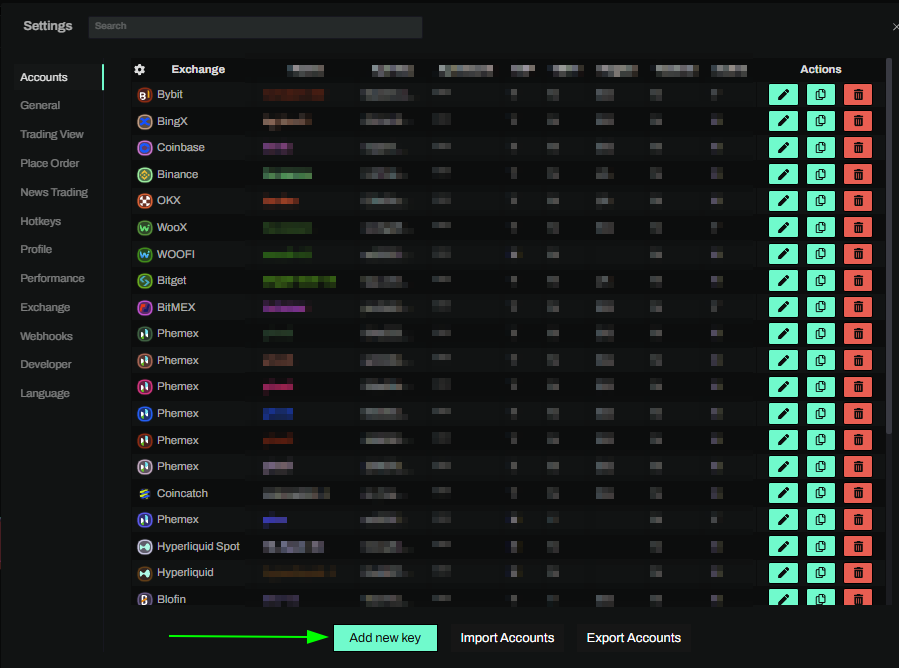
- Click the 'Settings' button near the top right corner of the terminal.

- Click the 'Add new key' button at the bottom of the settings page.
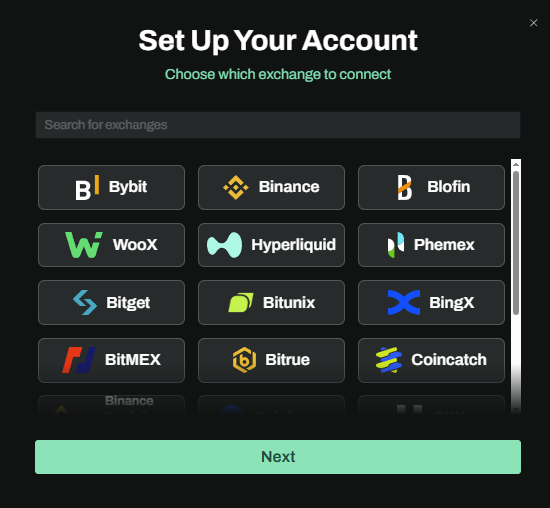
- Choose MEXC from the exchange selection menu.
Okay lets go back to our MEXC account and create the API Key.
Creating the API key
- Now you are ready to generate the API key within your MEXC account. Head back to the MEXC tab and open API Management from your account menu.
- Start the API key creation flow.
- Choose a label or note for the key. This only needs to help you recognize the key inside MEXC.
Keep the MEXC tab and Tealstreet settings page open at the same time. You may need to copy Tealstreet's recommended IP addresses into the MEXC API form before the key is created.
API permissions
- Enable the permissions needed for futures trading:
- Read access for account, balance, orders, and positions.
- Trade access for placing, editing, and cancelling orders.
- Do not enable withdrawal permissions. Tealstreet never needs withdrawal access.
- If MEXC asks you to bind or whitelist IP addresses, copy the IP addresses shown in the Tealstreet API key form and paste them into the MEXC whitelist field.
- Complete any email, SMS, or two-factor verification prompts MEXC requires.
- After the key is created, keep the API Key and API Secret available. You will need both for Tealstreet.
Never share your API keys with anyone. Tealstreet team members will never ask you what your API key or API secret is.
Connecting the key to Tealstreet
Now return to the Tealstreet API key form where you selected MEXC.
- Give the key a name. This can be anything you want.
- Choose the color you want this account to use in the terminal.
- Paste the API Key MEXC showed you when the key was created.
- Paste the API Secret MEXC showed you when the key was created.
- Click Done.
Never share your API Keys with anyone. Tealstreet team members will never ask you what your API key is.
Be sure to double check you do not confuse API Key and API Secret. Connecting your MEXC exchange account to Tealstreet will not work if these fields are not entered correctly.
If all the details are correct, you will have successfully linked your MEXC account to Tealstreet.
- Close the Settings page and navigate to the Main Trading page. Select the MEXC account you just linked to enable it.
- If properly linked, you will see your balance appear in the Margin window of Tealstreet. Happy trading!!!
- For more information check out our Quick Start Guide.
Troubleshooting
MEXC rejects the API key
Double check that the API key and API secret were copied into the correct Tealstreet fields. MEXC does not use an API passphrase for this connection.
If you enabled IP restrictions on MEXC, make sure the whitelist exactly matches the IP addresses shown in the Tealstreet API key form. If you switch Tealstreet routing regions later, update the MEXC whitelist before trading.
I can see market data but cannot place orders
Confirm the API key has futures trading permissions enabled. Read-only keys can load some account or market information, but they cannot place, edit, or cancel orders.
Scaled orders submit slowly or batch orders are unavailable
MEXC's futures batch order endpoint is only available to market maker accounts. If MEXC returns You do not have access to the interface, this usually means the API key or account UID is not entitled to that market maker-only interface. It is not, by itself, evidence that the REST source IP or proxy is missing a market maker allowlist.
Tealstreet falls back to paced single-order submission when the batch endpoint is unavailable. If you need higher scaled-order throughput, ask MEXC whether your account UID and API key can be enabled for futures batch order placement, and separately confirm any per-UID and per-IP request limits that apply to your proxy or routing setup.
MEXC shows lower maximum leverage than the risk table
MEXC may lock its highest leverage tiers behind advanced KYC or other account-level eligibility checks. The public risk-limit table can show leverage tiers that are not available to every account. If MEXC or Tealstreet shows a lower cap for your account, complete any advanced KYC steps MEXC requires or contact MEXC support to confirm your account's leverage eligibility.
Does Tealstreet support MEXC spot trading?
No. Tealstreet's MEXC integration is intended for perpetual futures trading.